iFrame Quick Pricer with Callback
In This Topic
The iFrame option enables third-part Loan Origination Systems to access the Quick Pricer system to obtain pricing information directly via call back.
iFrame does not support price locking on the Lender Price system. All locks must be managed by the LOS client system-of-record.
Request Authentication Token
In order to access the Lender Price Quick Pricer using iFrame a JWT token is required. This token may be obtained using the following information:
Authentication URL: {APIURL}/rest/v1/lp-ppe-api/ext-quick-pricer/request
Method: POST
HEADER information:
Request Payload:
|
Copy Code |
data class RequestDto(
   /** Username of main API user for integration */
   var username: String,
   /** Password for User Api Password */
   var password: String,
   /** Target user email or encompass ID of user in LP system that requires pricing */
   var target: String,
   /** Reference Id from the third party integrator
    *  For testing purpose can use "Test"
    */
   var externalId: String,
   /**
    * The search parameter which will be used
    * to fill the loan pricing field in the price
    * Alternatively, do not pass field if unknown see link for detail search object
    * http://documenter.lenderprice.com/Pricing%20Request.html
    */
   var search: Json?
) |
Response Payload:
The following path parameter value(s) are returned and must be included in the iFrame URL when initiating an iFrame session:
JWT_TOKEN and REFRESH_JWT
OR
For additional information, refer to Initiate an iFrame Session.
Lender Price Portal UI Callback and Setup
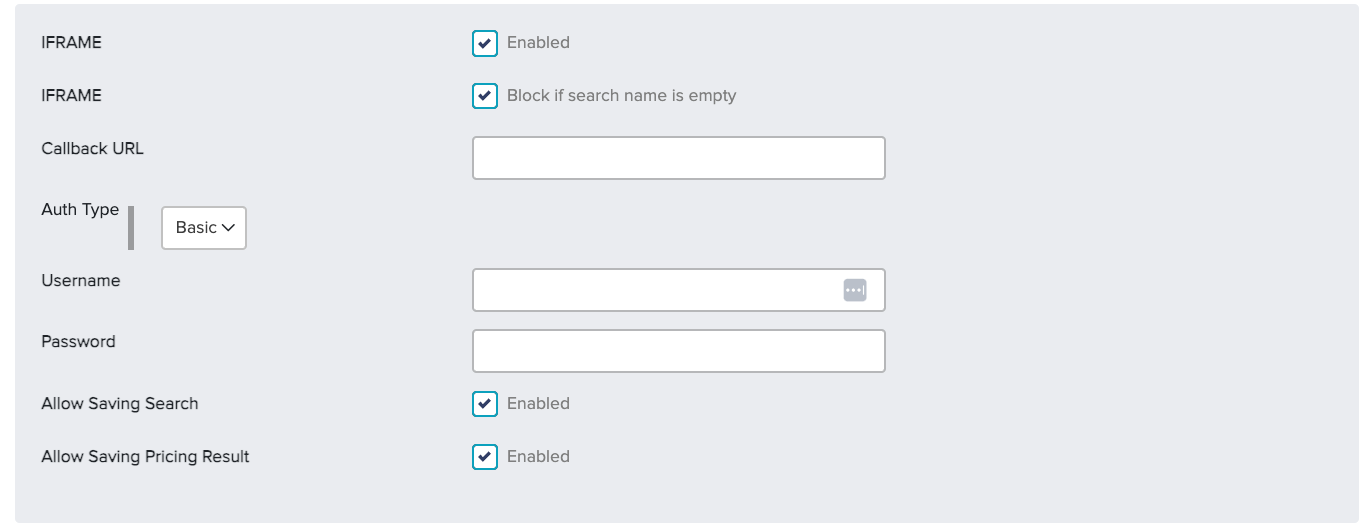
Configure the fields on the Lender Price Portal UI as indicated:
-
IFRAME: Check the Enabled box.
-
IFRAME: Check the Block if search name is empty box.
-
Callback URL: Enter the URL that is to be called by Lender Price in order to post the response.
-
Auth Type: If not already selected, select Basic from the pull-down list.
-
Username: Provide the Lender Price username (lp_username) for the loan officer initiating the iFrame session.
-
Password: Provide the Lender Price password (lp_password) for the loan officer initiating the iFrame session.
-
Allow Saving Search: To display the Save Search option, check the Enable box.
-
Allow Saving Pricing Result: To display the Pricing Registration option, check the Enable box.
Initiate an iFrame Session
To initiate an iFrame session, enter either of the following URL addresses into a web browser:
https://[SERVER]/#/los-quick-pricer?tk=[JWT_TOKEN]&rtk=[REFRESH_JWT]
OR
https://[SERVER]/#/los-quick-pricer?ttk=[TINY_TOKEN]
Callback Data Transfer Object (DTO)
| Callback DTO |
Copy Code |
data class ExtQuickPricerCallbackDto(
   val externalId: String,
   val type: ExtQuickPricerCallbackType = ExtQuickPricerCallbackType.PAYLOAD_FOR_SELECTED_PRICING,
   val search: Json,
   val lineResult: Json? = null // response including rates, points, lenders etc.
) |
For information about parsing lineResult data, refer to Parse Line Result Data.
Environment Information
Stage
UAT
Production
For additional information about system variables used for login credentials, refer to LOS Authentication.