LOS Action Callback
Get notified as soon as LenderPrice finishes a loan action you requested. This page covers setup in LenderPrice, optional token authentication, and the message your system receives. Setup takes about 10 minutes.
How It Works
When a job you sent to LenderPrice finishes, for example an addLockEvent, LenderPrice sends the result to your callback URL as an HTTP POST. Your system no longer needs to poll Check Queue Item for the outcome.
- For companies with LOS Integration set to None. LenderPrice does not push results into an LOS for you, so the callback carries them instead.
- You choose the actions. Only the action types you select send a callback.
- Sent once, right away. Each callback is sent a single time, as soon as the job finishes. It is not retried.
- Authentication is optional. When on, LenderPrice gets a token from your auth endpoint and sends it as a Bearer token.
Before You Start
You need a LenderPrice user with access to Config for your company, and the items below.
| What you need | When | Example |
|---|---|---|
| Callback URL that accepts a JSON POST over HTTPS | Always | https://api.yourcompany.com/lenderprice/callback |
| The action types to be notified about | Always | ADD_LOCK_EVENT |
| Auth URL that returns a token for a username and password | With authentication | https://api.yourcompany.com/oauth/token |
| Username and password for that auth URL | With authentication | A service account for LenderPrice |
Token path, if the token is not in access_token | With authentication | data.token |
Set Up the Callback
Step 1. Open the Event Callback settings
Click Config in the top menu. In the Configuration Sitemap, find LOS Integrations and check that it shows None. Then click Event Callback.

If LOS Integrations shows a different LOS, contact LenderPrice support before you continue.
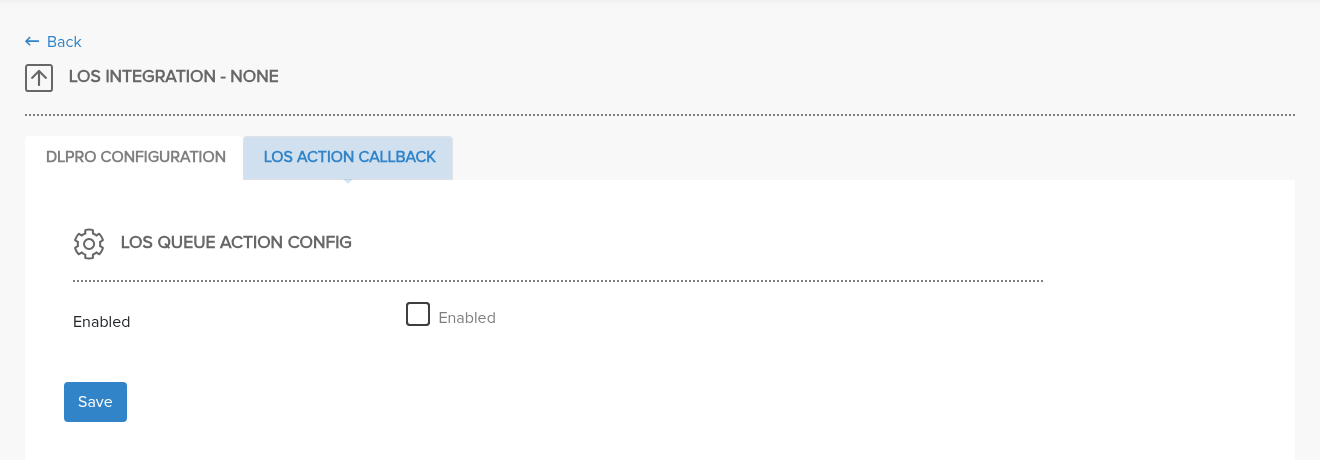
Step 2. Turn the callback on
The LOS Action Callback tab opens. Tick Enabled to show the settings.
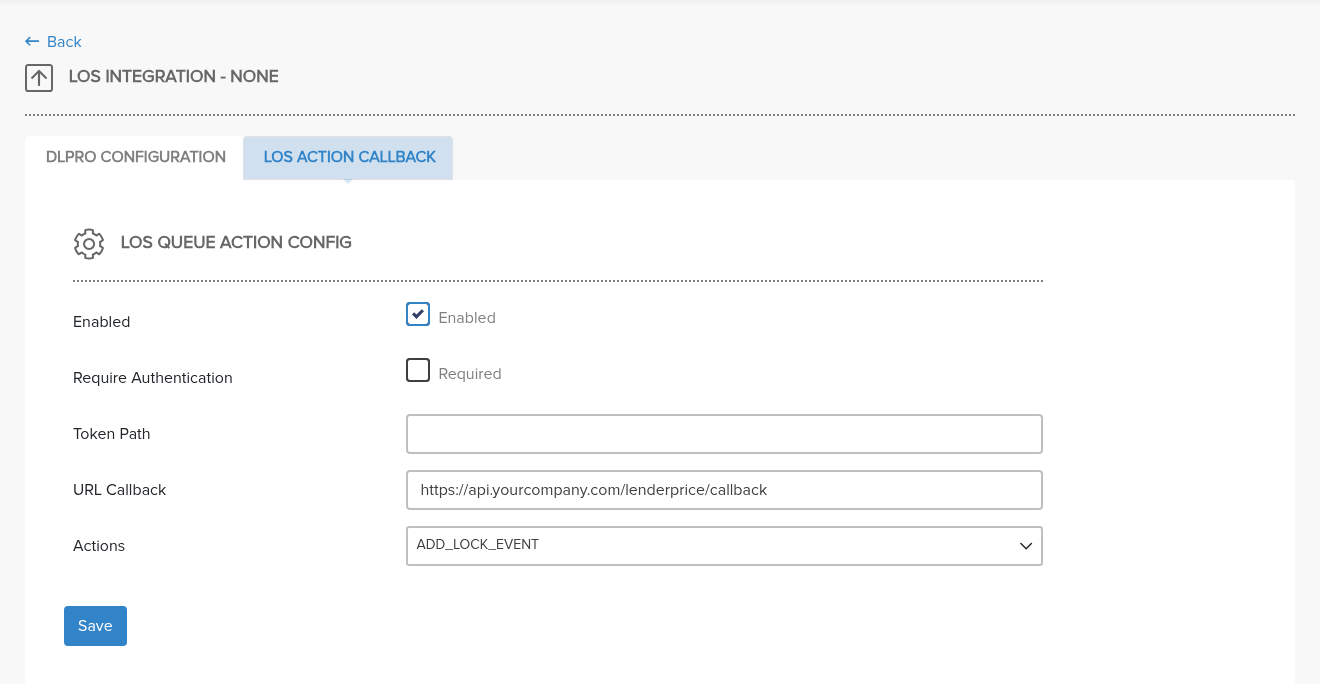
Step 3. Enter your callback URL and choose actions
- Enter your endpoint in URL Callback.
- Under Actions, select each action type that should send a callback.
- Leave Require Authentication unticked if your endpoint does not need a token.
- Click Save. A green Configuration saved message confirms it.
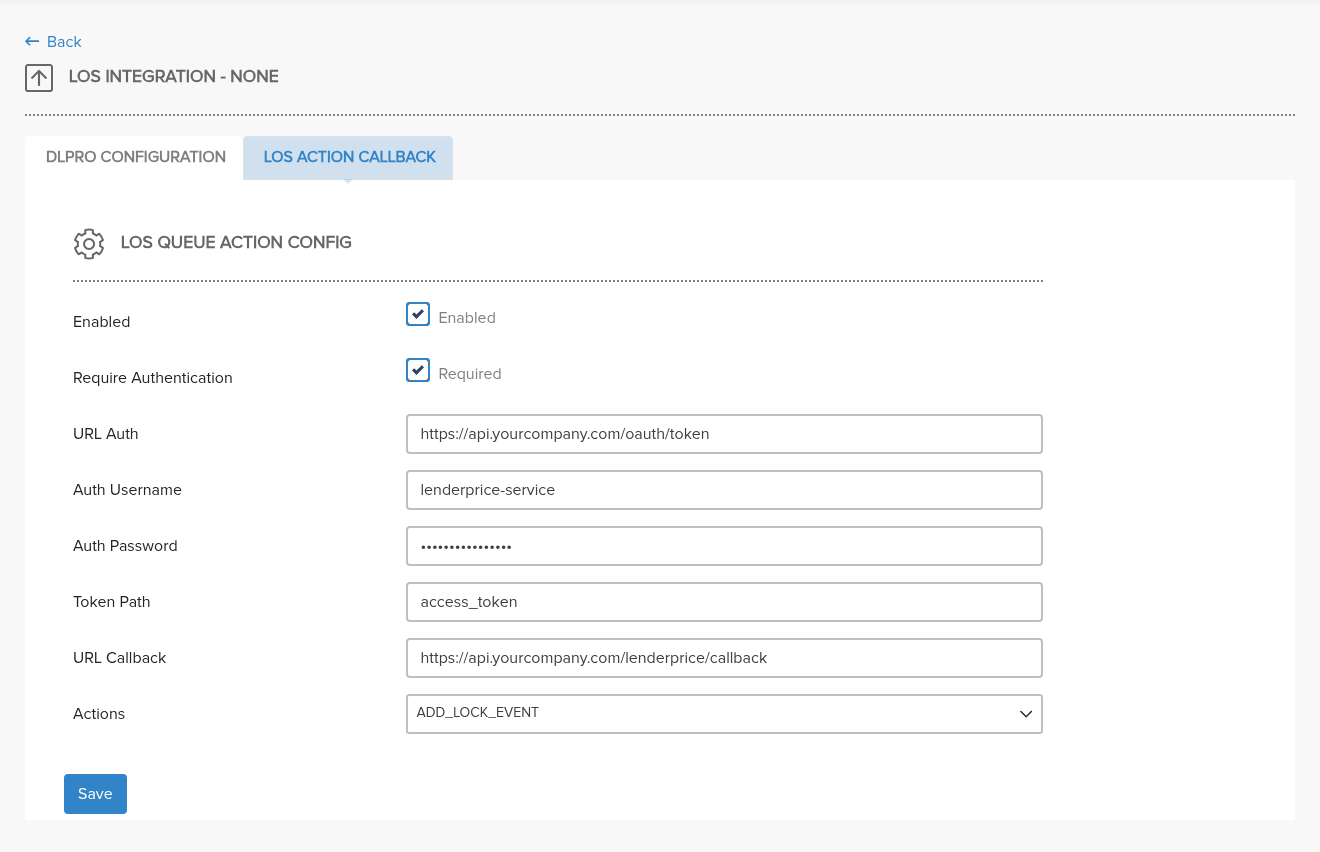
Step 4. Turn on authentication (optional)
Tick Require Authentication, then fill in URL Auth, Auth Username, Auth Password and, if needed, Token Path. Click Save. See Authentication for how the token is used.
Settings reference
| Setting | What it does |
|---|---|
| Enabled | Turns callbacks on or off for your company. |
| Require Authentication | When ticked, LenderPrice gets a token before each callback. Off by default. |
| URL Auth | Your token endpoint. Shown only with authentication on. |
| Auth Username / Auth Password | Credentials sent to URL Auth. Shown only with authentication on. |
| Token Path | Where the token sits in the auth response, in dot notation. Blank means access_token. Used only with authentication on. |
| URL Callback | Your endpoint that receives each callback. |
| Actions | The action types that send a callback. |
Authentication
Authentication is off by default. Turn it on if your callback endpoint requires a Bearer token. LenderPrice then requests a fresh token before every callback.
1. LenderPrice requests a token with a POST to your URL Auth:
{
    "username": "<Auth Username>",
    "password": "<Auth Password>"
}
2. Your auth endpoint returns the token. LenderPrice reads access_token by default:
{
    "access_token": "eyJhbGciOi...",
    "expires_in": 3600
}
If the token is nested, set Token Path in dot notation. For example, data.token reads {"data": {"token": "..."}}.
3. LenderPrice sends the callback with the header Authorization: Bearer <token>.
If the token request fails, or no token is found at the token path, the callback is not sent.
With authentication off, callbacks are sent without an Authorization header and Token Path is ignored. Turning authentication off also clears the saved auth URL, username and password.
The Callback Message
Each callback is one HTTP POST to your URL Callback with a JSON body.
Headers
| Header | Value |
|---|---|
Content-Type | application/json |
Accept | application/json |
Authorization | Bearer <token>, only with authentication on |
Example body
{
    "eventId": "65a1b2c3d4e5f6a7b8c9d030",
    "type": "ADD_LOCK_EVENT",
    "date": "2026-11-02T14:05:31Z",
    "losLoanId": "LN-100245",
    "lpLoanId": "LP-1001",
    "status": "Success",
    "lockStatus": "Locked",
    "message": ""
}
Fields
| Field | Type | Description |
|---|---|---|
eventId | string | ID of the job this callback reports on. This is not the queueItemId returned by addLockEvent; match on losLoanId or lpLoanId plus type. |
type | string | The action type, for example ADD_LOCK_EVENT. |
date | string | When the callback was sent, in ISO 8601 format (UTC). |
losLoanId | string | Your loan ID, as you sent it. |
lpLoanId | string | The LenderPrice loan number. |
status | string | Success or Failed. |
lockStatus | string | The loan's lock status after the action, including any automatic status change that followed. |
message | string | Why the job failed. Empty on success. |
Your response. Return any 2xx status to acknowledge the callback. LenderPrice does not read the response body.
Troubleshooting
| Symptom | What to check |
|---|---|
| No callbacks arrive | Enabled is ticked, URL Callback is filled in, and the action type is selected under Actions. Click Save after any change. |
| Callbacks stopped after turning on authentication | URL Auth is filled in, and your auth endpoint returns a token at access_token or at your Token Path. |
| Your endpoint returns 401 Unauthorized | Authentication is off, so no Authorization header is sent. Tick Require Authentication and fill in the auth settings. |
| A callback was missed while your endpoint was down | Callbacks are sent once and are not retried. Use Check Queue Item for the outcome, or contact support with the eventId or loan number. |
status is Failed | The message field explains why the job failed. |
For anything else, contact LenderPrice support with your company name, the loan number and the time of the action.
See Also
- Locking a Loan Without LOS -- overview and lock status flow
- Submit a Lock Request -- the
addLockEventcalls that trigger callbacks - Post-Lock Operations -- polling the queue instead of a callback